
Building a Multi-Tenant SaaS Platform on AWS
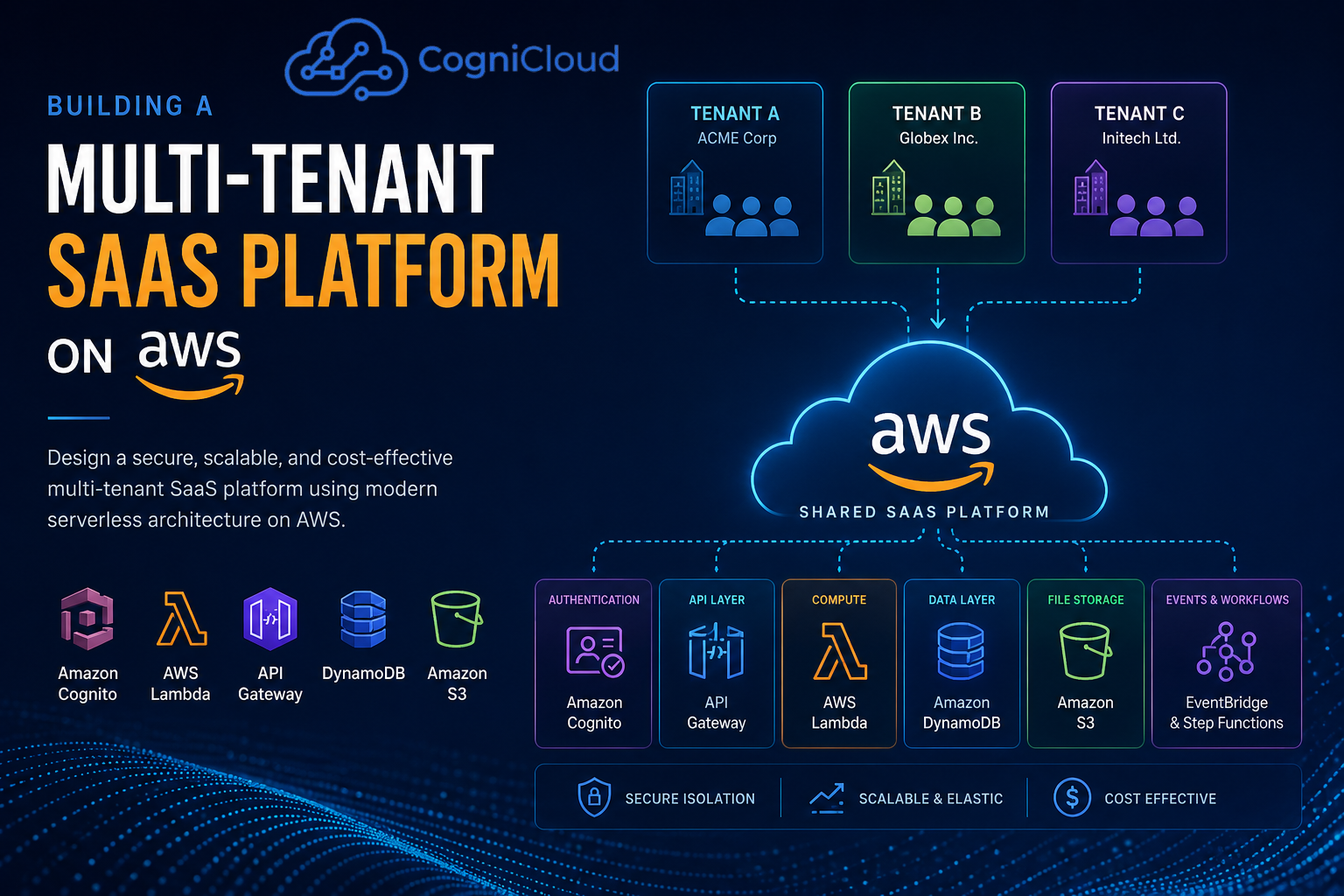
Building a SaaS product is relatively easy when you have only one customer.
Building the same product for hundreds or thousands of customers while keeping their data isolated, controlling infrastructure costs, maintaining performance, and operating everything from a single platform is a completely different engineering challenge.
This is where multi-tenancy becomes important.
A well-designed multi-tenant SaaS platform allows multiple customers—or tenants—to use the same application while maintaining appropriate isolation of their data, users, workloads, and configuration.
In this article, we'll explore how to design a production-oriented multi-tenant SaaS platform on AWS using a serverless architecture.
The architecture discussed here uses:
- React for the frontend
- Node.js for backend services
- Amazon API Gateway
- AWS Lambda
- Amazon Cognito
- Amazon DynamoDB
- Amazon S3
- AWS IAM
- Amazon CloudWatch
- AWS Step Functions
- Amazon EventBridge
- AWS CDK / Infrastructure as Code
- GitHub Actions for CI/CD
The goal isn't to present one "perfect" architecture.
Instead, the goal is to understand why certain architectural decisions matter and how they can evolve as the SaaS product grows.
What Exactly Is Multi-Tenancy?
A tenant is usually an organization or customer using your SaaS product.
For example, imagine we are building an HR management platform.
We could have:
Tenant A → ABC Technologies
Tenant B → XYZ Solutions
Tenant C → Acme Corporation
All three companies use the same SaaS application.
However:
ABC Technologies
    ↓
Employees
Departments
Payroll
Attendance
Documents

XYZ Solutions
    ↓
Employees
Departments
Payroll
Attendance
Documents
ABC must never be able to access XYZ's employees.
That sounds obvious.
But the challenge becomes much greater when the system contains:
- Authentication
- APIs
- Databases
- File storage
- Background jobs
- Caches
- Queues
- Logs
- Analytics
- Billing
- Notifications
- Third-party integrations
Every layer needs to understand the tenant boundary.
Why Multi-Tenancy Is Difficult?
The biggest mistake when building a multi-tenant application is thinking:
"I'll just add a
tenantIdcolumn to the database."
A tenant identifier is necessary, but it isn't sufficient.
Consider this request:
GET /api/employees
Authorization: Bearer <JWT>
The application needs to determine:
Who is the user?
        ↓
Which tenant does the user belong to?
        ↓
What roles does the user have?
        ↓
What resources can the user access?
        ↓
Query only that tenant's data
If any layer gets this wrong, the application could expose another tenant's information.
Therefore, tenant isolation should be an architectural concern rather than something added later.
AWS's SaaS guidance identifies tenant isolation, tenant identity, data partitioning, tenant onboarding, tenant tiers, noisy-neighbor management, and tenant-aware operations as important parts of a SaaS architecture.
A Reference AWS Architecture
For a serverless SaaS platform, a high-level architecture could look like this:
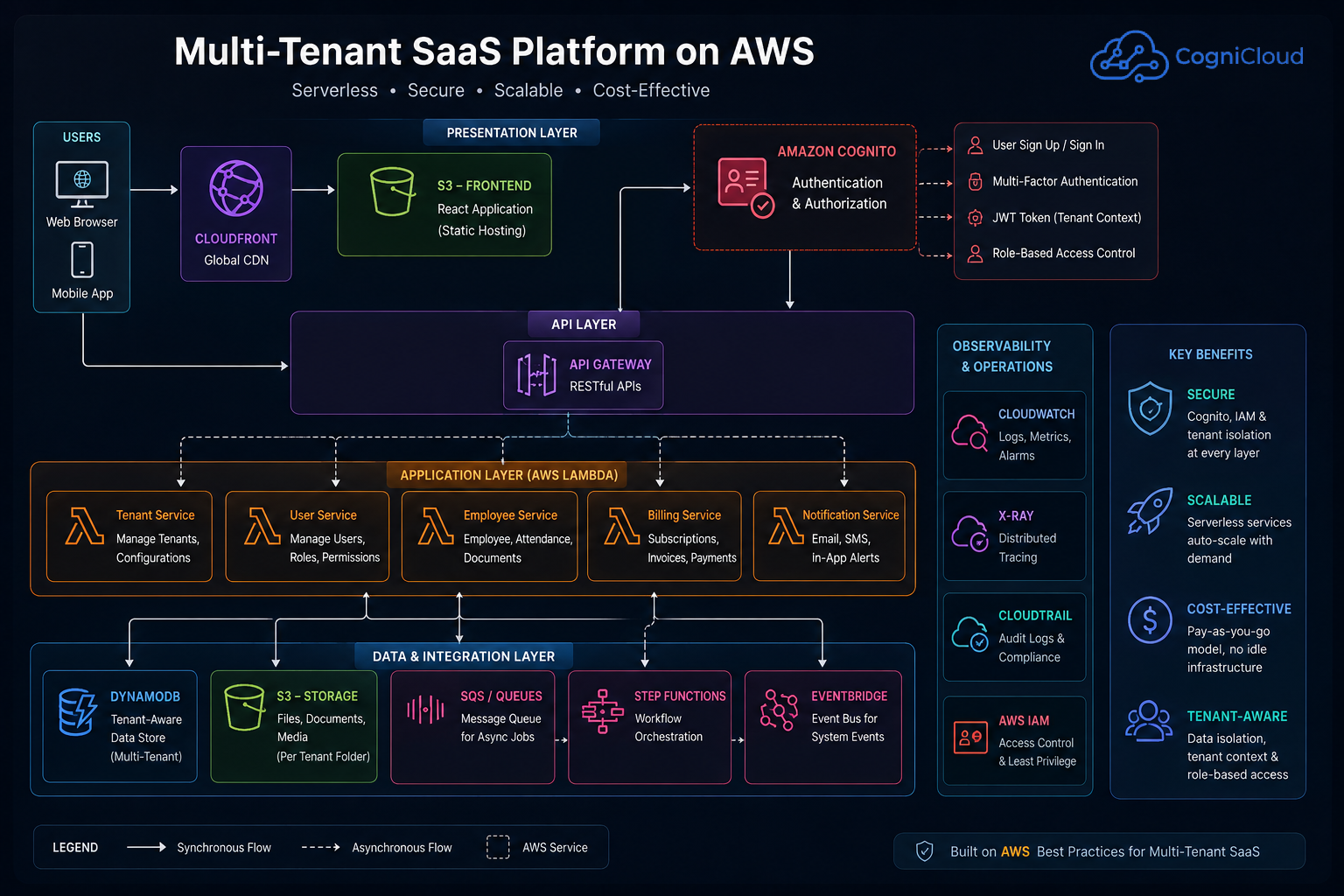
The frontend is responsible for the user experience.
The backend provides APIs.
Cognito handles authentication.
API Gateway provides the API entry point.
Lambda executes application logic.
DynamoDB stores application data.
S3 stores files and objects.
Event-driven services handle asynchronous processing.
CloudWatch provides observability.
Control Plane vs Application Plane
One of the most useful concepts in SaaS architecture is separating the control plane from the application plane.
Control Plane
The control plane manages the SaaS platform itself.
Examples include:
- Tenant registration
- Tenant provisioning
- Subscription management
- Tenant configuration
- User administration
- Feature flags
- Tenant lifecycle
- Billing configuration
- Provisioning workflows
Conceptually:
                CONTROL PLANE

       ┌─────────────────────────┐
       │ Tenant Management       │
       │ Subscription Management │
       │ Provisioning            │
       │ Configuration           │
       │ Billing                 │
       └────────────┬────────────┘
                    │
                    ▼
             Tenant Environment
Application Plane
The application plane handles the actual business functionality.
For an HR SaaS application, this could include:
Employee Service
Department Service
Attendance Service
Leave Service
Payroll Service
Document Service
Notification Service
Keeping these responsibilities separate makes the system easier to evolve.
AWS also recommends the control-plane concept for managing tenant onboarding and other SaaS lifecycle operations.
Choosing a Tenant Isolation Model
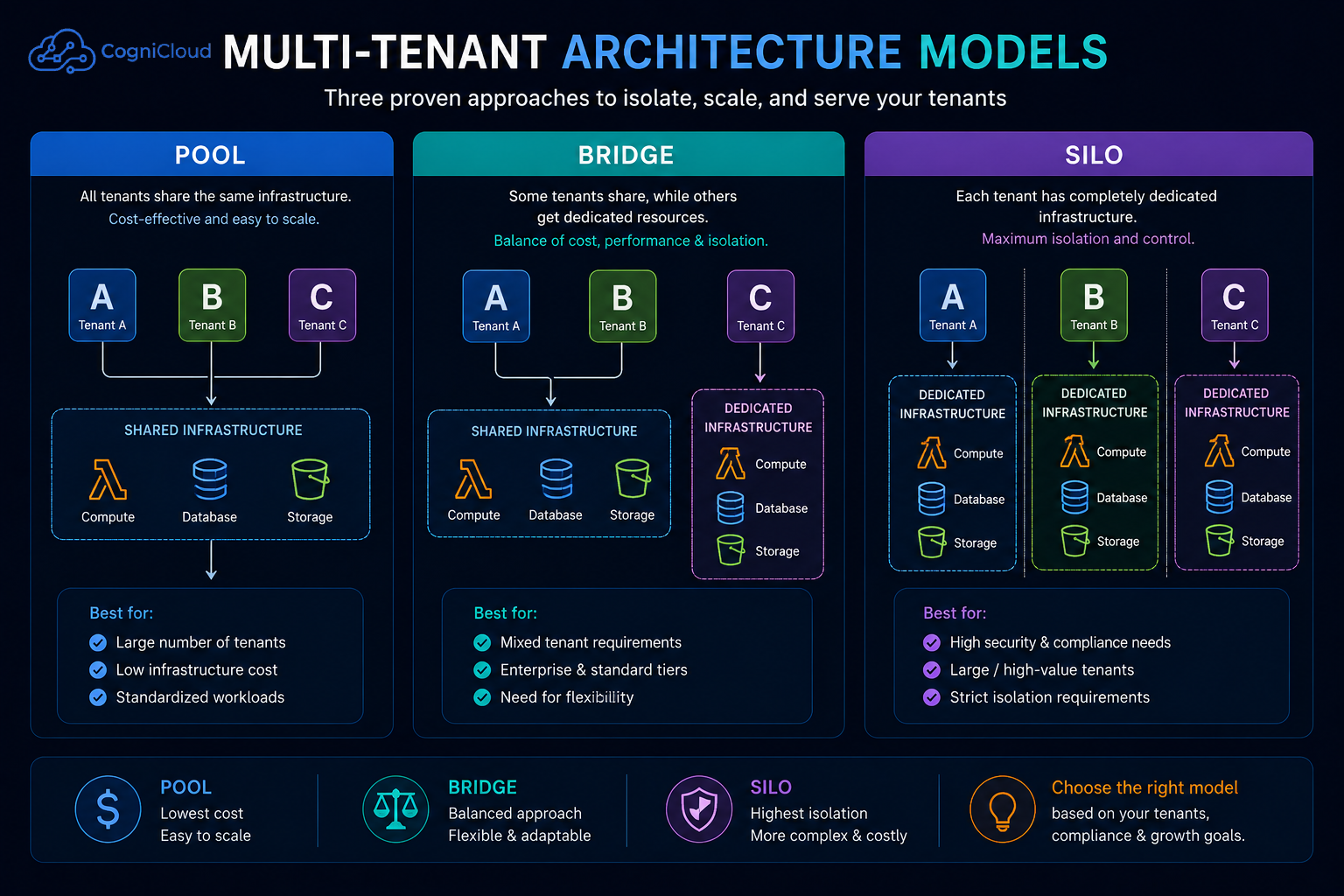
AWS SaaS architecture commonly discusses three models:
- Pool
- Silo
- Bridge
The right answer depends on your security, compliance, performance, and cost requirements.
1. Pool Model
In a pooled architecture, tenants share infrastructure.
For example:
                    API
                     │
                     ▼
              Shared Lambda
                     │
                     ▼
              Shared Database
             ┌───────┼───────┐
             ▼       ▼       ▼
          Tenant A Tenant B Tenant C
The application uses the tenant context to ensure that each tenant can access only its own records.
For example:
tenantId = "tenant-001"
A database query should effectively become:
WHERE tenantId = "tenant-001"
Advantages
- Lower infrastructure cost
- Easier deployment
- Easier scaling
- Better resource utilization
- Good fit for large numbers of small tenants
Disadvantages
- Strong application-level isolation is required
- Noisy-neighbor problems can occur
- Compliance requirements may be harder to satisfy
2. Silo Model
In the silo model, resources are dedicated to individual tenants.
For example:
Tenant A
 ├── API
 ├── Compute
 └── Database

Tenant B
 ├── API
 ├── Compute
 └── Database

Tenant C
 ├── API
 ├── Compute
 └── Database
This provides stronger physical or infrastructure-level isolation.
Advantages
- Strong isolation
- Easier tenant-specific resource control
- Better fit for highly regulated customers
- Reduced noisy-neighbor risk
Disadvantages
- Higher infrastructure cost
- More operational complexity
- More resources to provision and monitor
AWS describes this as the silo model.
3. Bridge Model
In real SaaS platforms, you don't always have to choose one model for everything.
A bridge model combines pooled and siloed resources.
For example:
                    Shared API
                        │
              ┌─────────┼─────────┐
              ▼         ▼         ▼
          Service A Service B Service C
              │         │         │
              ▼         ▼         ▼
           Shared     Shared    Dedicated
           Storage    Storage    Storage
You might have:
Standard customers
        ↓
Pooled infrastructure

Enterprise customers
        ↓
Dedicated resources
This is particularly useful when different customer tiers have different requirements.
AWS explicitly recognizes this mixed approach as the bridge model.
AWS SaaS Lens — Silo, Pool and Bridge Models
Tenant Identity
Tenant isolation starts with identity.
When a user logs in, the application needs to know:
User
 ↓
Tenant
 ↓
Role
 ↓
Permissions
Amazon Cognito can provide the authentication layer.
A JWT could contain claims such as:
{
  "sub": "user-123",
  "tenantId": "tenant-001",
  "role": "admin"
}
The backend can then use the tenant context while processing requests.
However, there is an important principle here:
Never trust a tenant ID supplied directly by the client when the authenticated identity already establishes the tenant context.
For example, this is dangerous:
GET /api/employees?tenantId=tenant-999
if the backend simply trusts the query parameter.
Instead, derive the tenant context from the authenticated identity and authorization layer.
Example Node.js Tenant Context
A simplified middleware could look like this:
function tenantContext(req, res, next) {
    const claims = req.auth;

    if (!claims?.tenantId) {
        return res.status(403).json({
            message: "Tenant context missing"
        });
    }

    req.tenantId = claims.tenantId;

    next();
}
Then the service layer can use:
const employees = await employeeRepository.findByTenant(
    req.tenantId
);
The important architectural principle is:
Request
   ↓
Authentication
   ↓
Tenant Context
   ↓
Authorization
   ↓
Business Logic
   ↓
Tenant-Scoped Data Access
Tenant context should not be scattered randomly throughout the application.
Designing the Data Layer
There are several ways to partition tenant data.
For a pooled database, a simple approach is:
Employees

id
tenantId
name
email
departmentId
createdAt
Every tenant-owned entity carries a tenant identifier.
For example:
{
  "id": "emp-1001",
  "tenantId": "tenant-001",
  "name": "John Doe",
  "email": "john@example.com"
}
The critical rule is:
Every data access path must be tenant-aware.
Don't rely on developers remembering to add:
tenantId = X
to every query.
Instead, design repositories and service boundaries so tenant context is required.
DynamoDB Considerations
DynamoDB can work well for serverless SaaS architectures.
A possible key structure might be:
PK = TENANT#tenant-001
SK = EMPLOYEE#emp-1001
For example:
PK                  SK
------------------------------------------
TENANT#001          EMPLOYEE#1001
TENANT#001          EMPLOYEE#1002
TENANT#002          EMPLOYEE#2001
TENANT#002          EMPLOYEE#2002
This makes tenant boundaries explicit in the data model.
However, DynamoDB design should be driven by access patterns, not by simply converting a relational schema into DynamoDB tables.
Before designing the table, identify questions such as:
Get employee by ID
List employees for tenant
List employees by department
Find attendance by employee
Get leave records for employee
Then design partition and sort keys around those queries.
File Storage with Amazon S3
Files introduce another important tenant-isolation problem.
Suppose tenants upload:
Employee documents
Invoices
Contracts
Profile photos
Reports
A logical S3 structure could be:
s3://my-saas-bucket/

tenant-001/
    employees/
    documents/
    reports/

tenant-002/
    employees/
    documents/
    reports/
For example:
tenant-001/employees/emp-1001/profile.jpg
The application should never allow a user from tenant-002 to retrieve:
tenant-001/employees/emp-1001/profile.jpg
For private objects, use controlled access such as presigned URLs rather than exposing the bucket publicly.
Tenant Onboarding
Tenant onboarding is another area where SaaS architecture becomes interesting.
Imagine a new customer signs up:
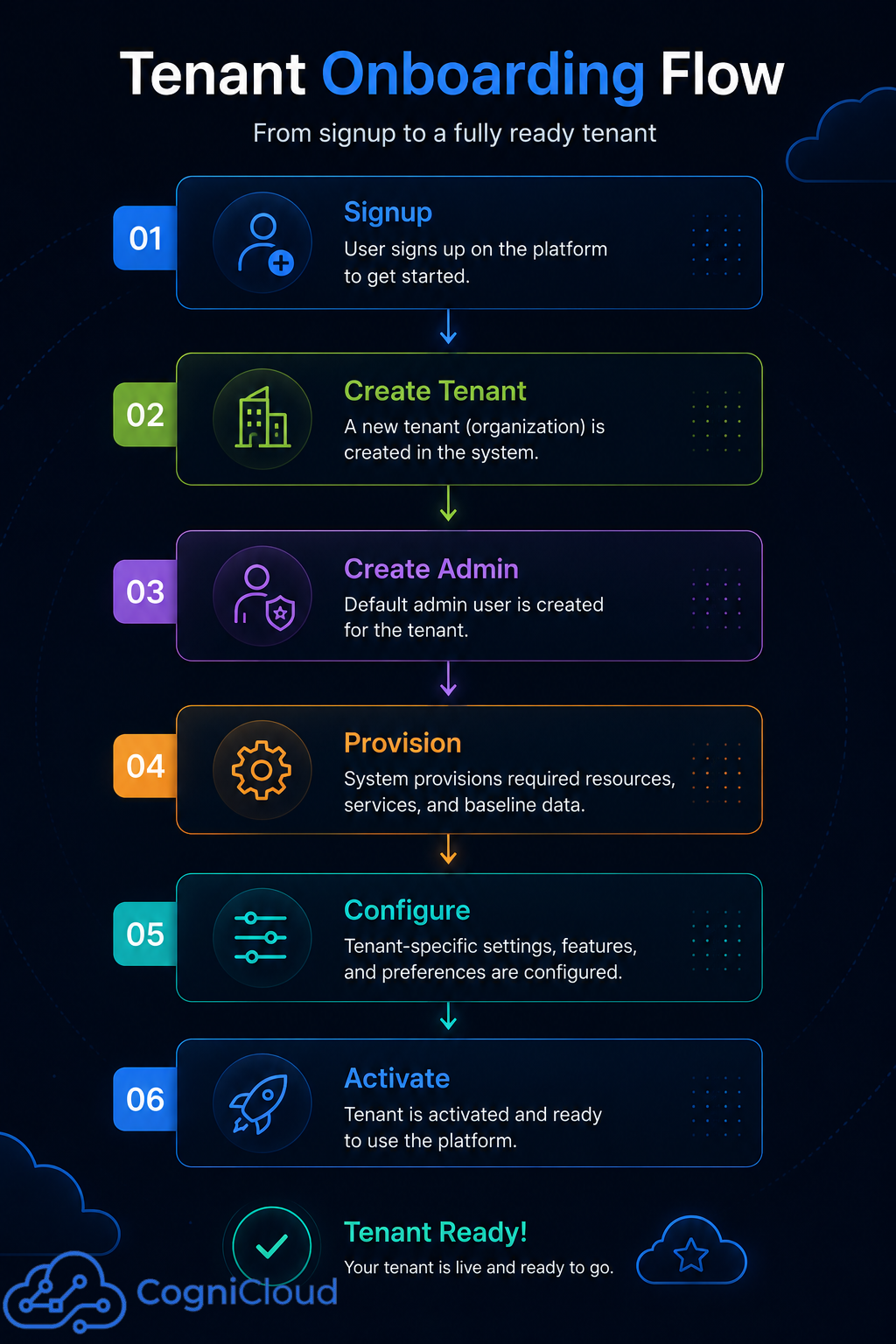
This workflow shouldn't necessarily happen inside a single synchronous HTTP request.
Instead, it can be event-driven.
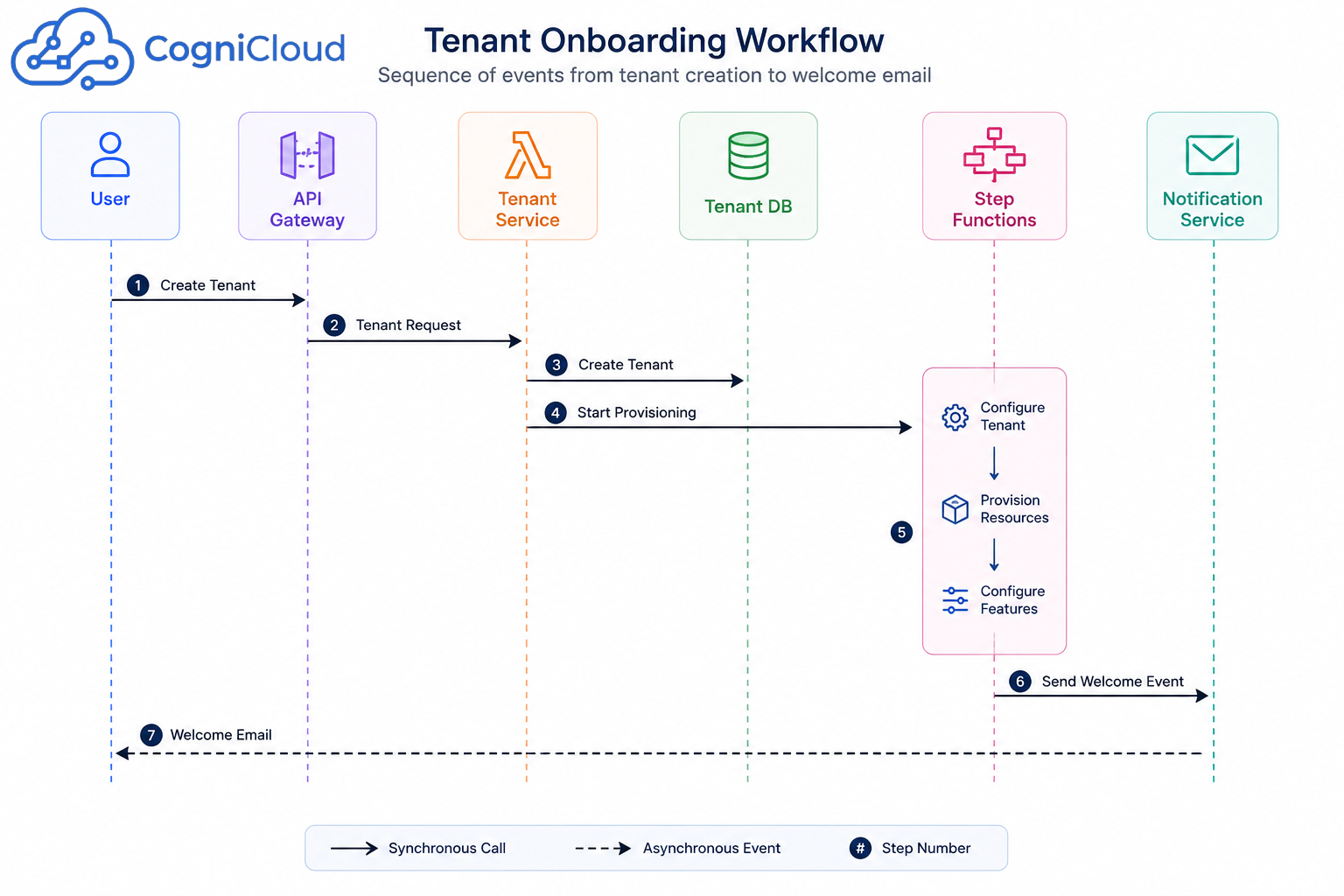
AWS Step Functions can be particularly useful when onboarding involves multiple dependent steps.
AWS's SaaS guidance also describes centralized tenant onboarding through a control plane.
Handling the Noisy Neighbor Problem
A common multi-tenant problem is the noisy neighbor.
Imagine:
Tenant A → 100 requests/sec
Tenant B → 10 requests/sec
Tenant C → 5 requests/sec
If Tenant A consumes most of the available resources, other customers may experience degraded performance.
Possible strategies include:
- API throttling
- Per-tenant rate limits
- Queue-based processing
- Reserved resources for premium tenants
- Separate workloads for high-volume tenants
- Tenant-specific concurrency limits
- Monitoring tenant consumption
A simple conceptual model:
Tenant
  │
  ▼
Rate Limiter
  │
  ├── Within limit → Process
  │
  └── Exceeded → Throttle / Queue
AWS's SaaS guidance specifically recommends scaling and throttling mechanisms to prevent one tenant from adversely affecting other tenants.
AWS SaaS Lens — Preventing Noisy Neighbors
Security Considerations
Security should be designed into the architecture rather than added after development.
Important areas include:
Authentication
Use Amazon Cognito or another identity provider.
User
 ↓
Cognito
 ↓
JWT
 ↓
API Gateway
Authorization
Authentication answers:
Who are you?
Authorization answers:
What are you allowed to do?
Both are required.
Tenant Isolation
Every request should have a trustworthy tenant context.
JWT
 ↓
Tenant ID
 ↓
Authorization Policy
 ↓
Tenant-scoped resource
IAM
Use least-privilege IAM policies.
Avoid giving Lambda functions unrestricted access to every AWS resource simply because it is convenient during development.
For example:
Employee Service
     ↓
Only required DynamoDB permissions
     ↓
Only required S3 permissions
Encryption
Use encryption at rest and TLS in transit.
For sensitive SaaS environments, tenant-specific encryption strategies may also be appropriate.
Observability
A SaaS platform needs to answer questions such as:
Which tenant generated this error?

Which tenant is consuming the most resources?

Which tenant is generating the most API requests?

Which tenant experienced latency?

Which tenant's background job failed?
Therefore, tenant context should be included in logs and metrics where appropriate.
For example:
{
  "requestId": "req-123",
  "tenantId": "tenant-001",
  "userId": "user-123",
  "service": "employee-service",
  "operation": "getEmployee",
  "duration": 132,
  "status": 200
}
This becomes extremely valuable when troubleshooting production issues.
Tenant-Aware Logging
Instead of:
ERROR Database timeout
prefer something closer to:
ERROR
tenantId=tenant-001
service=employee-service
operation=getEmployee
error=DatabaseTimeout
Be careful not to log sensitive personal or business information.
The goal is to make operational troubleshooting possible without creating a new data-security problem.
CI/CD for a Multi-Tenant SaaS
Infrastructure should be treated as code.
A typical deployment flow could be:
flowchart LR

    Dev[Developer]
    Git[GitHub]
    CI[GitHub Actions]
    Test[Tests]
    Build[Build]
    Deploy[Infrastructure Deployment]
    AWS[AWS]

    Dev --> Git
    Git --> CI
    CI --> Test
    Test --> Build
    Build --> Deploy
    Deploy --> AWS
Tools such as:
- AWS CDK
- AWS SAM
- Terraform
- GitHub Actions
can be used to automate infrastructure and application deployments.
For example:
git push
   ↓
GitHub Actions
   ↓
Run tests
   ↓
Build
   ↓
Deploy Lambda
   ↓
Deploy React
   ↓
Update infrastructure
   ↓
Production
Automation becomes especially important when the SaaS platform grows.
A Practical Project Structure
A Node.js serverless application could be organized like this:
saas-platform/
│
├── frontend/
│   ├── src/
│   ├── components/
│   ├── pages/
│   └── services/
│
├── services/
│   ├── tenant/
│   ├── user/
│   ├── employee/
│   ├── billing/
│   └── notification/
│
├── infrastructure/
│   ├── api/
│   ├── database/
│   ├── authentication/
│   ├── storage/
│   └── monitoring/
│
├── tests/
│
├── package.json
└── README.md
The exact structure depends on whether the application uses a monorepo, multiple repositories, or a microservices-oriented architecture.
Should Everything Be a Microservice?
No.
This is an important lesson.
A SaaS application does not automatically need 20 microservices.
For an early-stage SaaS product, a modular monolith can often be a better choice.
For example:
Node.js Application
│
├── Tenant Module
├── User Module
├── Employee Module
├── Billing Module
└── Notification Module
As the system grows, individual modules can be extracted into independent services.
For example:
                    API
                     │
          ┌──────────┼──────────┐
          ▼          ▼          ▼
       Tenant     Employee    Billing
       Service    Service     Service
The architecture should evolve according to actual scaling, ownership, deployment, and operational requirements—not because "microservices" sounds more enterprise.
A Production-Oriented Architecture
Putting the concepts together, we could arrive at something like:
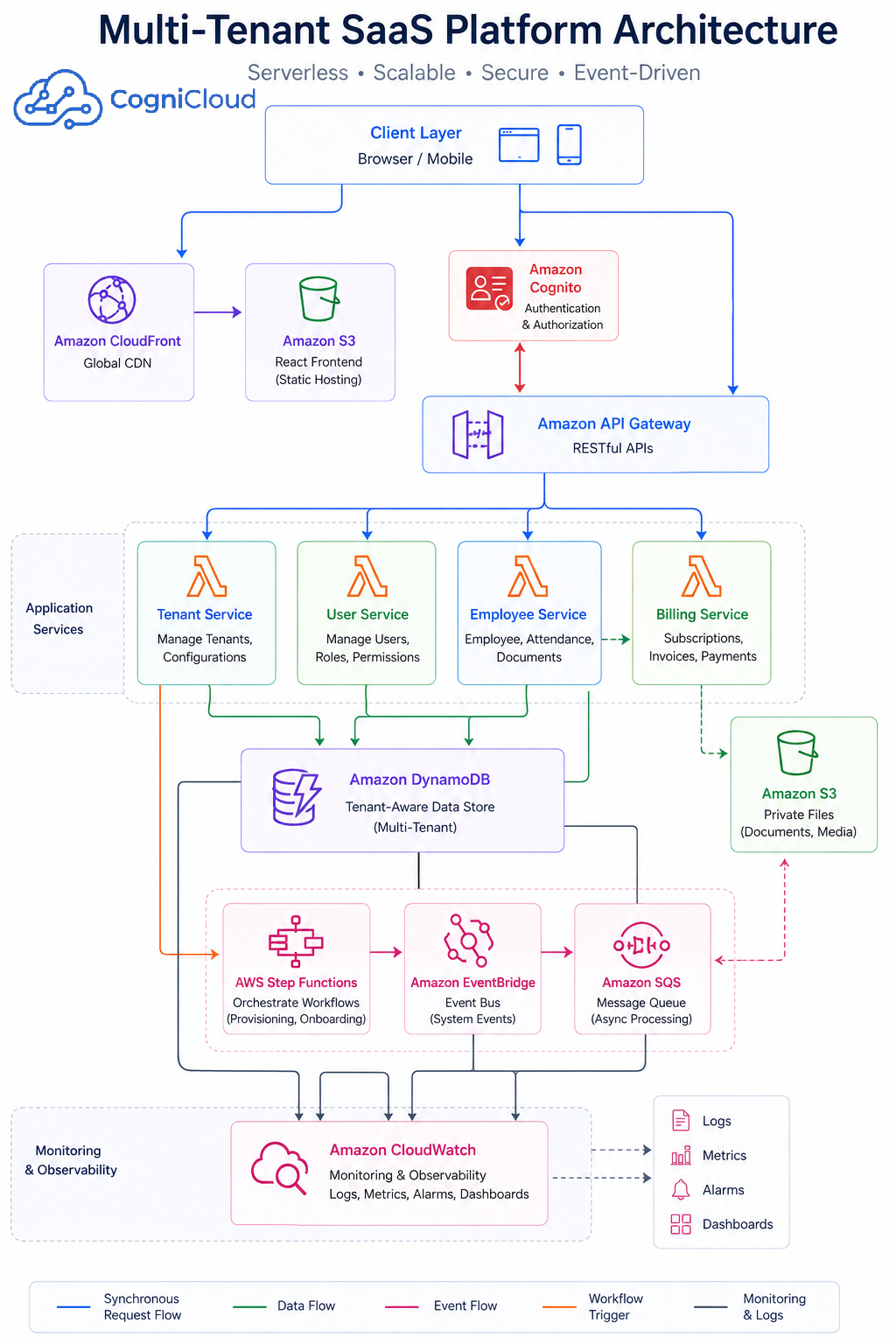
This is not the only possible architecture.
The important thing is that the architecture explicitly addresses:
Identity
   +
Tenant Context
   +
Isolation
   +
Data Partitioning
   +
Onboarding
   +
Scaling
   +
Observability
   +
Security
Pool vs Silo vs Bridge — Which Should You Choose?
There is no universal answer.
A useful decision framework is:
| Requirement | Pool | Silo | Bridge |
|---|---|---|---|
| Lowest infrastructure cost | Excellent | Poor | Good |
| Large number of tenants | Excellent | Difficult | Good |
| Strong isolation | Moderate | Excellent | Excellent |
| Enterprise customers | Sometimes | Excellent | Excellent |
| Simple operations | Excellent | More complex | Moderate |
| Noisy-neighbor control | Moderate | Excellent | Excellent |
| Tenant-specific resources | Limited | Excellent | Excellent |
| Compliance requirements | Depends | Strong | Strong |
For many SaaS products, a good starting point is:
Small / Standard tenants
        ↓
Pool

Enterprise / High-volume tenants
        ↓
Bridge or Silo
This allows the architecture to evolve without forcing every customer onto expensive dedicated infrastructure.
Common Mistakes
Mistake 1 — Trusting tenantId from the frontend
Never assume:
req.body.tenantId
is trustworthy.
Tenant context should come from an authenticated and authorized identity.
Mistake 2 — Adding tenant isolation only at the database layer
Tenant isolation should exist across:
Authentication
Authorization
API
Application
Database
Storage
Queues
Background jobs
Logging
Monitoring
Mistake 3 — Creating a separate AWS account for every customer too early
Dedicated infrastructure can be useful.
But doing it for every small customer can dramatically increase operational complexity.
Start with requirements, not assumptions.
Mistake 4 — Ignoring background jobs
Suppose Tenant A uploads 50,000 files.
A background worker processes them.
If the queue doesn't understand tenant consumption, Tenant A could dominate the workers.
Tenant-aware throttling and workload isolation matter here too.
Mistake 5 — Ignoring tenant lifecycle
A tenant isn't just:
CREATE tenant
You also need to think about:
Create
Activate
Suspend
Upgrade
Downgrade
Deactivate
Delete
Restore
Tenant lifecycle management belongs in the architecture from the beginning.
A Better Way to Think About SaaS Architecture
The most important lesson is that multi-tenancy isn't a database feature.
It is an architectural property.
Think about the tenant boundary at every layer:
                 TENANT
                    │
       ┌────────────┼────────────┐
       ▼            ▼            ▼
   Identity       Data        Resources
       │            │            │
       ▼            ▼            ▼
    Cognito      DynamoDB       Lambda
       │            │            │
       └────────────┼────────────┘
                    ▼
               Operations
                    │
                    ▼
              CloudWatch
Once the tenant becomes a first-class concept in the architecture, many other decisions become easier.
Final Thoughts
Building a multi-tenant SaaS platform on AWS isn't simply about putting multiple customers into the same application.
The real challenge is designing a system where:
- Tenants are securely identified.
- Tenant data is isolated.
- Infrastructure can scale.
- One customer cannot become a noisy neighbor.
- New tenants can be onboarded automatically.
- Enterprise customers can receive stronger isolation when required.
- Operations remain manageable as the tenant count grows.
- Infrastructure costs remain under control.
AWS provides a large set of managed services that can help achieve these goals.
But the services themselves don't create a good SaaS architecture.
The architecture comes from how those services are combined.
For a new SaaS product, I would generally start with a pooled architecture, establish strong tenant-aware identity and data-access patterns, automate onboarding, and then introduce bridge or silo isolation selectively for customers whose requirements justify the additional infrastructure.
That approach provides a practical balance between:
Security + Scalability + Cost + Operational Simplicity
And most importantly, it gives the platform room to evolve.
Recommended AWS Resources
For deeper reading, these are excellent starting points:
- AWS Well-Architected SaaS Lens
- AWS SaaS Lens — Silo, Pool and Bridge Models
- AWS SaaS Tenant Isolation Strategies
- AWS — Building Blocks of Multi-Tenant SaaS Architecture
- AWS — Building a Multi-Tenant SaaS Solution Using Serverless Services
- AWS — Tenant Onboarding Best Practices